The ionCube PHP extension
ionCube is a small and free PHP extension that is required in order to
use FileRun. It can be downloaded from
https://www.ioncube.com/loaders.php
Checking if ionCube is installed
Create a file named info.php inside your FileRun installation folder, and paste the
following line inside:
1<?php phpinfo();
Open the URL of the file (something like https://yourdomain.com/filerun/info.php) in your browser.
It should provide information about your PHP configuration, as in the following example:
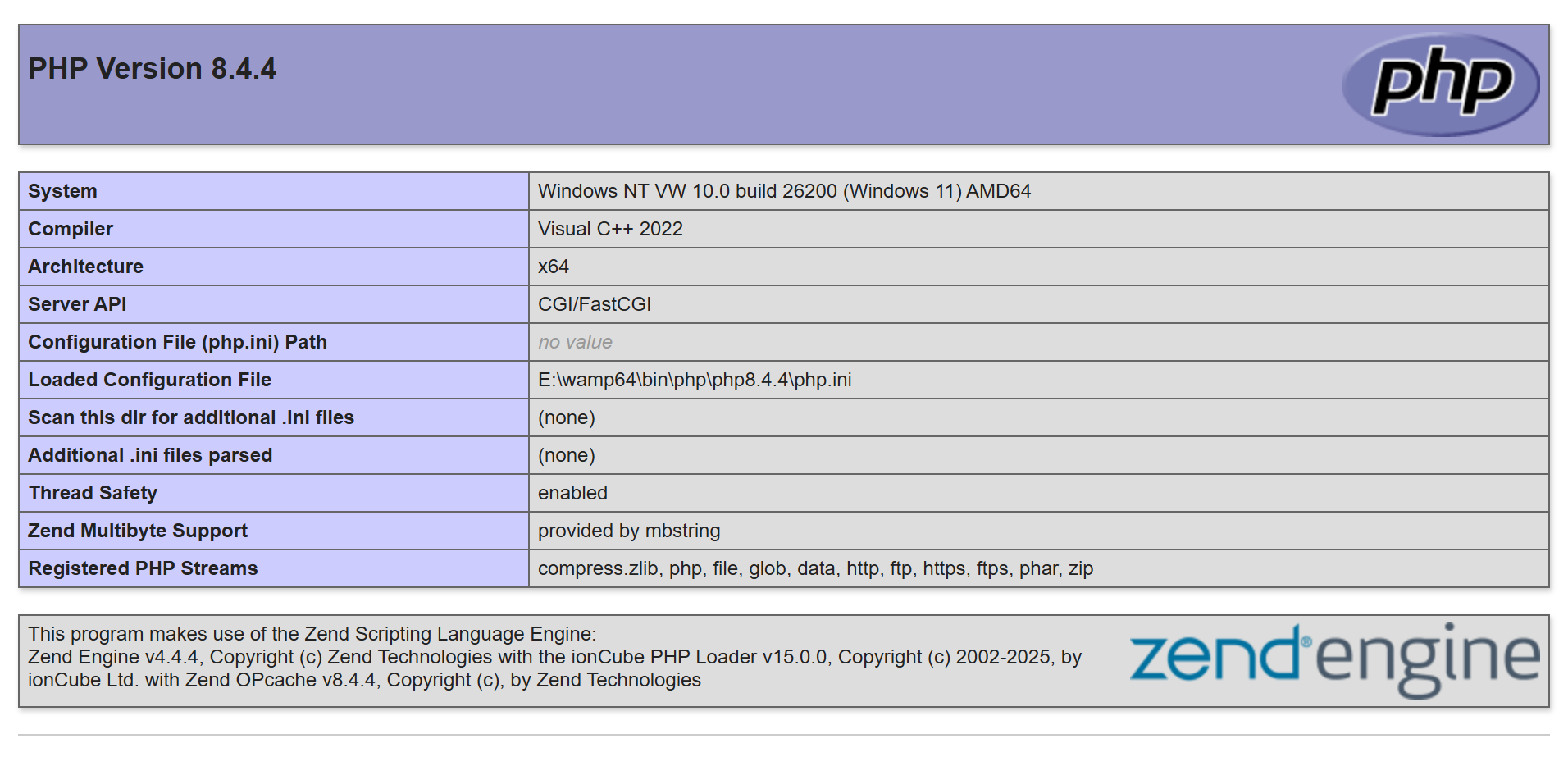
If ionCube PHP loader is installed, you will see its name and version listed in the second box.
Choosing the right version
On this page: https://www.ioncube.com/loaders.php
-
Search the list, beginning with the operating system.
-
If Windows: Find the right Visual C++ version (in the screenshot under
Compiler) -
Find the right thread-safety version (in the screenshot under
Thead Safety). IfThread Safetyisdisabled, you need to choose aNon-TSionCube version. (The file will be named something likeioncube_loader_lin_8.4_ts.so- note the_tspart) -
Find the right server CPU architecture (in the screenshot under
Architecture). Ifx64you will need a 64 bits ionCube. Ifx86you will need a 32 bits ionCube. -
Download the package file.
Inside the package file, you might find various .dll (Windows) or .so (Linux/Mac) files.
Choose the one that matches your PHP version and the right thread safety version (with _ts or
without).
Manual installation
You can do it yourself if you have access to the PHP configuration file
php.ini. Most hosting services allow you to either create a custom PHP
configuration file inside any of your folders, or they provide a PHP
configuration editor inside their control panels.
Depending on the PHP details that you checked above, your configuration line might look like this:
For Linux and PHP 8.4, add a line like this:
1zend_extension = /usr/local/ioncube/ioncube_loader_lin_8.4.so
For FreeBSD and php 8.4, add a line like this
1zend_extension_ts = /usr/local/ioncube/ioncube_loader_fre_8.4_ts.so
For Windows and php 8.4, add a line like this
1zend_extension_ts = c:\WINNT\ioncube_loader_win_8.4.dll
It is always best and easier to contact your hosting company tech support and ask them about the appropriate configuration line.